
Know your
breathing room.
Usi loose track ya ganji zako
Maganji is a personal finance app and M-Pesa expense tracker built for Kenya. It reads your M-Pesa and Airtel Money messages and tells you the one number that matters: what's actually left to spend — not your balance, not your salary. All without an internet connection.
Three ideas. One honest number.
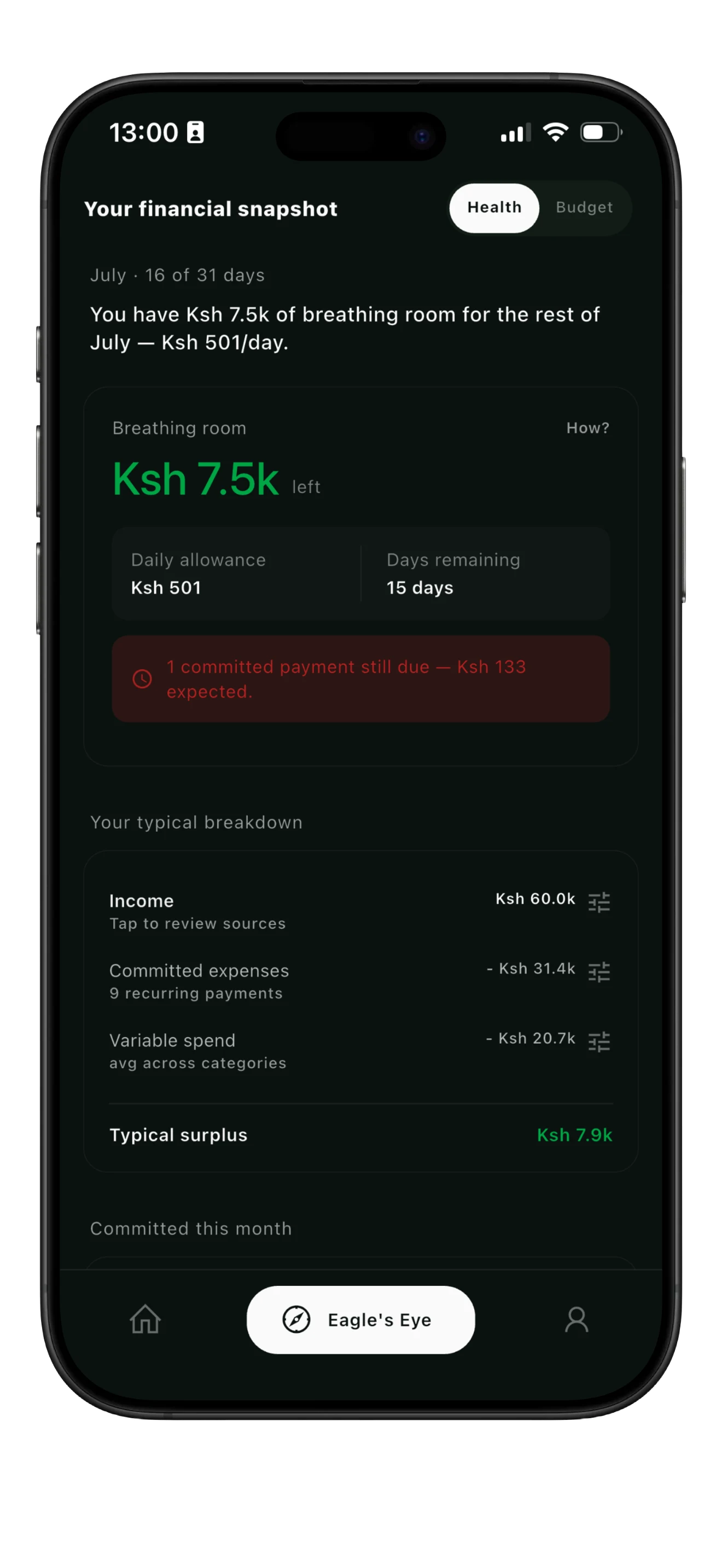
Your M-Pesa balance includes rent you haven't paid yet. Maganji works out what's actually yours, from the transactions you already have.
A typical month
Updated every day, straight from your real transactions.
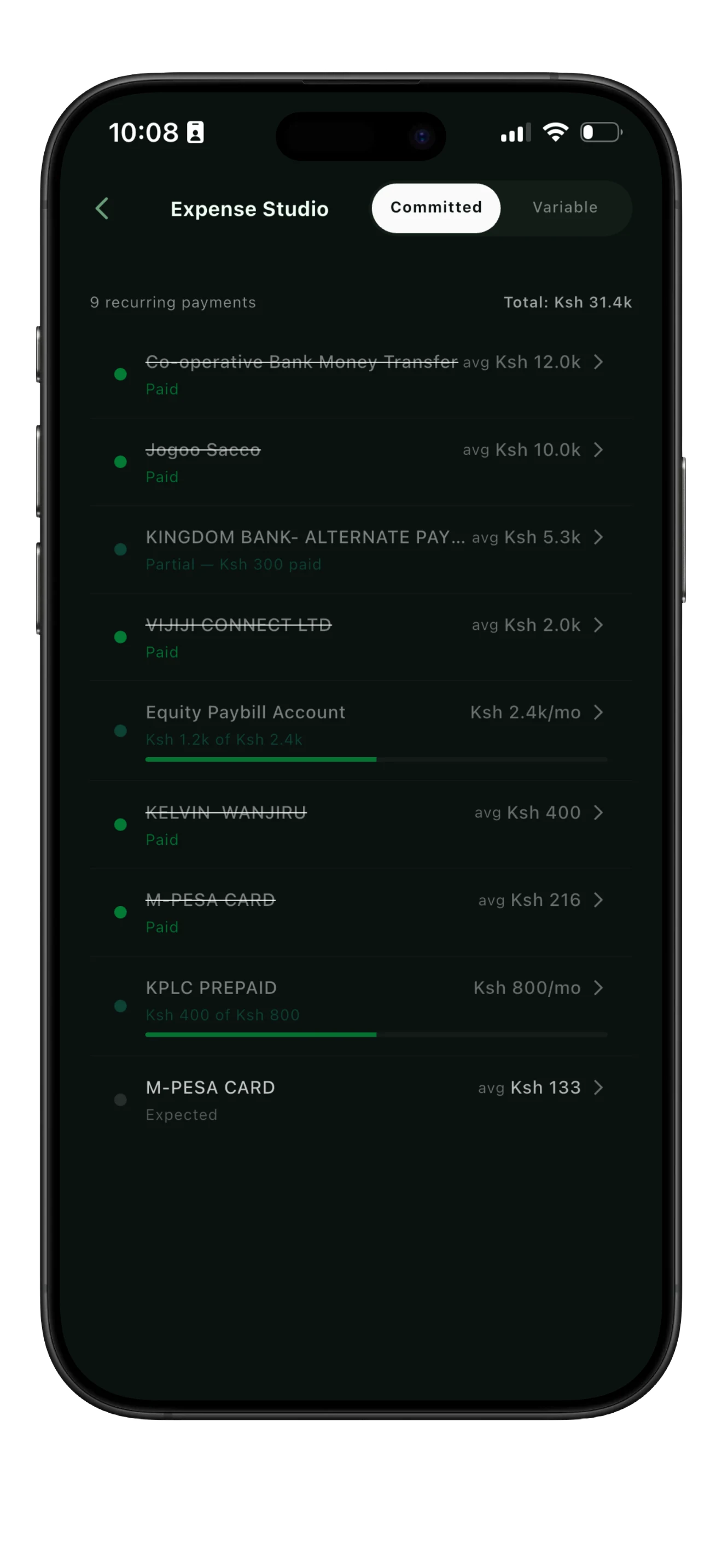
Committed expenses
Rent, NHIF, DSTV, school fees, loan repayments — the things you never really decide to pay, you just pay them. Maganji spots these automatically from your SMS history and crosses each one off as it clears. Anything still unpaid stays visible as expected, so nothing gets forgotten.
Paying something off in installments, like electricity in weekly top-ups? Maganji tracks your progress toward the full monthly total.
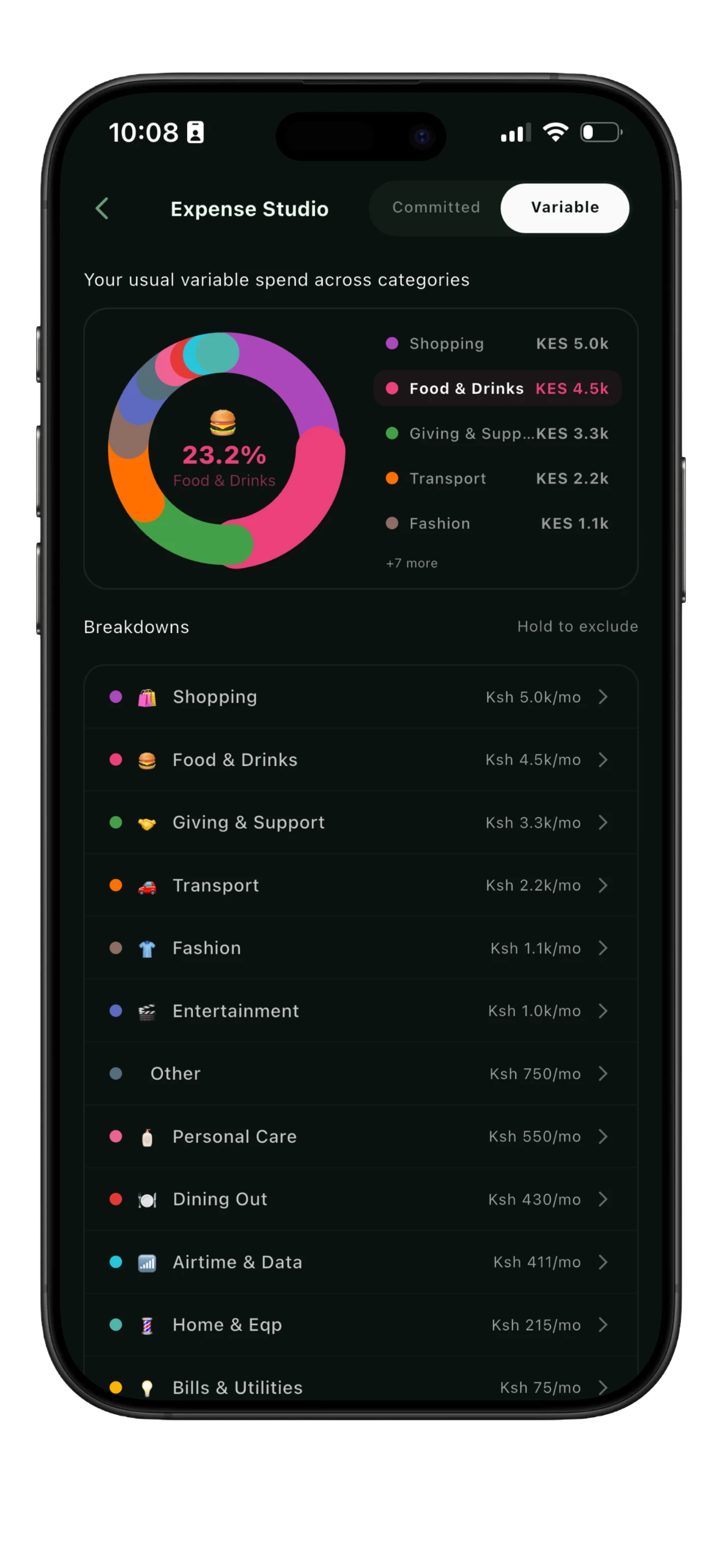
Variable expenses
Food, matatu fare, going out, subscriptions — what you choose to spend on. Maganji doesn't ask you to set a budget for these; it looks at six months of your real habits and shows you what your usual is, category by category. Spend within that and your breathing room stays put — only spending past it counts against you.
Your finances, finally making sense.
Maganji is a personal finance app and money manager built for Kenya, not adapted for it. From the moment a payment lands in your SMS inbox, it's already categorised, counted, and contributing to your monthly picture.
Zero-Touch Tracking
The automatic M-Pesa and Airtel Money expense tracker — every SMS is parsed the moment it arrives. Your transactions log themselves while you live your life.
Fully Offline
Your financial data never leaves your device. No cloud sync, no account required, no servers involved — ever.
Committed vs. Variable
Rent, NHIF, loan repayments — separated cleanly from food, transport, and everything you actually choose to spend on.
Smart Categories
Teach Maganji once — it applies the rule forever. Tag a Pochi payment to Susan as Groceries and every future payment follows.
Your Data, Always
Export to CSV, back up to Google Drive, restore anytime. Maganji keeps your history even when you switch phones.
Built for Kenya
Track your pesa the way you actually spend it — M-Pesa, Airtel Money, Equity, KCB, NCBA, Co-op and ABSA. Every major Kenyan payment channel, supported from day one.
Built around one question:
what can I actually spend?
As Kenya's budgeting app for M-Pesa and Airtel Money users, every screen answers one question. The Snapshot page leads with your breathing room. Committed expenses get crossed off as they clear. Variable spending shows itself as a mirror of your real habits — not a budget you were told to keep.
Frequently asked.
It's the money you can actually spend right now, without guilt. Not your M-Pesa balance — that includes rent you haven't paid yet and bills still coming. Breathing room is your income baseline, minus what's committed, minus what you've already spent variably this month. It updates every day as the month goes on.
Anything you pay the same way, most months — rent, NHIF, DSTV, school fees, loan repayments. Maganji spots these automatically once it's seen four or more months of consistent payments to the same recipient, and you can mark any transaction as committed yourself. Paid ones get crossed off; unpaid ones stay visible as “Expected” so nothing slips through. If you pay something in installments — electricity in weekly top-ups, for example — Maganji tracks your progress toward the full monthly amount.
Everything you choose, day to day — food, matatu fare, going out, subscriptions. Maganji doesn't ask you to set a budget for these. It looks at six months of your real spending, grouped by category, and shows you what your habits already are. Spending within your usual amount doesn't touch your breathing room — only spending past it does. A category with no history yet is simply marked “new this month, no baseline.”
Yes. Every number on the app has a “How?” you can tap to see exactly what went into it, and Logic Settings let you adjust the underlying rules — like how breathing room handles a bad month — to match how you actually think about your money.
Both. Maganji reads M-Pesa and Airtel Money messages the same way, plus statements from Equity, KCB, NCBA, Co-op, and ABSA.
That's exactly what Maganji is. Most personal finance apps are built for Western banking and translated for Kenya afterward. Maganji is built the other way round — around paybill, till number, send money, and how Kenyans actually get paid.
Yes — a seasonal Beat Januworry challenge is on the roadmap to help you plan around the December-to-January squeeze before it hits, using your own spending history rather than guesswork.
Maganji runs fully offline. There's no account, no login, and no server — your transaction data is parsed and stored only on your phone, and nothing is ever uploaded.
No. Maganji computes your typical variable spend from your own transaction history instead of asking you to guess a number up front and stick to it.
Recategorize it once and Maganji remembers — the same rule is applied automatically to every future transaction that matches.
Maganji is free to download and use. A premium upgrade unlocking further tools is on the way — pricing details will be announced closer to launch.
Poa. Free to download.
Start tracking
your money today.
No account. No subscription required. No internet connection needed. Just an honest number.